Made for the dental laboratory workflow
Rename exocad multi-die STL files with the names on your die tray.
Your die tray has individual names. Your exported coping files have project-based names. Multi-Dies Renamed matches those files to the die names already entered in your completed exocad project.
Get Multi-Dies Renamed on Microsoft Store
For Windows 10 (version 2004 or later) and Windows 11.
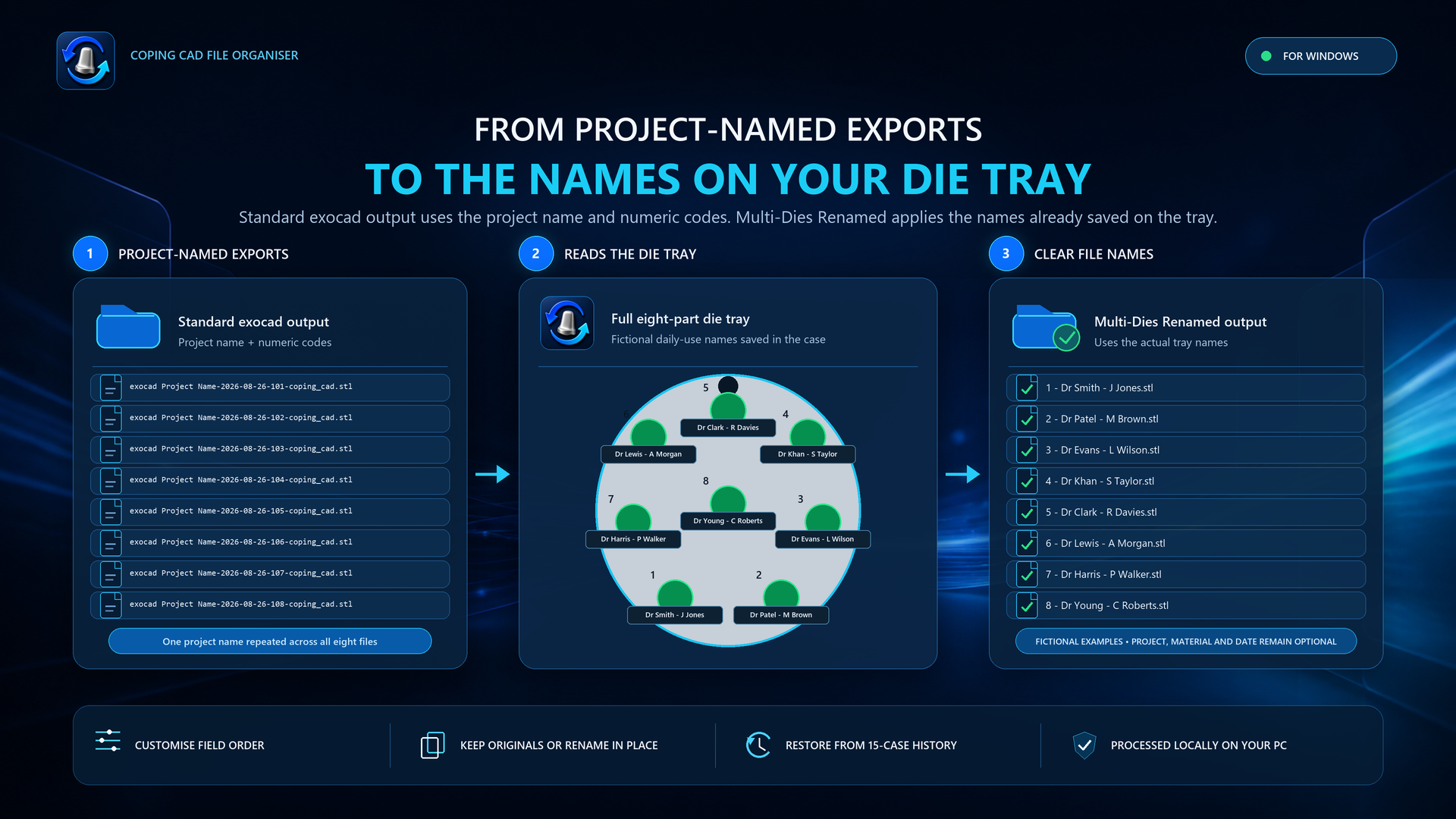
From project names to individual die names
In exocad Multidie mode, each position on the multi-die plate can have its own name. Multi-Dies Renamed reads those names from your .dentalProject and matches the supported finished coping STL exports.
exocad Project Name-101-coping_cad.stl1 - Dr Smith - J Jones.stlIllustrative example: the output uses your own die names and selected filename fields.
How to rename your multi-die exports
- Finish your coping exports in exocad. Keep the completed
.dentalProjectand corresponding-coping_cad.stlfiles together in the case folder. - Select or drop the project. Use the file picker or drag the
.dentalProjectfrom File Explorer into Multi-Dies Renamed. - Choose the filename and click Rename. Use the live preview to choose and reorder die number, multi-die name, project name, material and date fields.
Questions about exocad multi-die file naming
Does it work with every STL export?
No. It is designed for supported completed multi-die coping exports with matching -coping_cad.stl files and a readable .dentalProject. It is not a general STL converter or a tool for every exocad export type.
Will it use my dentist and patient names?
It uses the multi-die name already entered for each position in the project. If you entered a dentist and patient description there, that description can become part of the filename. The app does not invent or independently look up names.
Does it change the STL geometry?
No. Multi-Dies Renamed names and organises files; it does not design restorations or edit their geometry. Always verify your files before manufacture.
Is it an exocad plugin?
No. It is an independent Windows application that works with supported completed exports. You can open the case folder from exocad, then select or drag the project from File Explorer.
Give every exported coping a recognisable name
View the app and trial options on Microsoft Store
Multi-Dies Renamed is an independent utility and is not affiliated with or endorsed by exocad GmbH. exocad is a trademark of exocad GmbH.